- Words
- 572
- Reading time
- 3 min
- Last crawled
- 2026-09-27
- Language
- EN
-
[
Home
/
-
[
Integrations
/
-
[
Zapier
Connect SMASHSEND with 8,000+ apps using Zapier
Build automated workflows that connect SMASHSEND to your entire tech stack. Save hours every week with powerful, code-free automations.
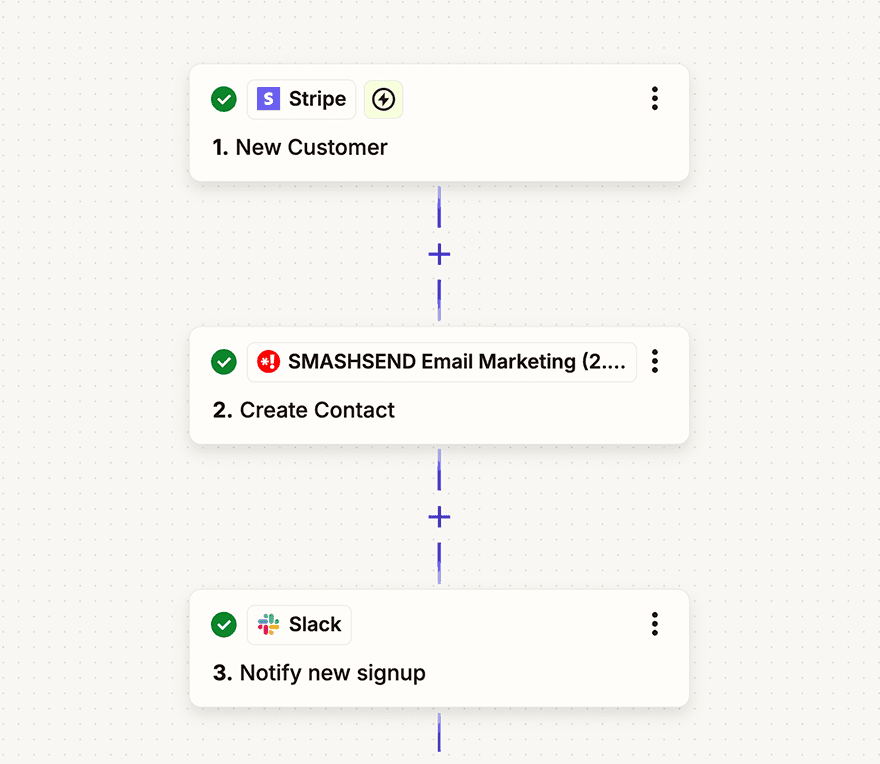
Automate your email marketing workflow
Zapier is the leader in workflow automation, connecting over 5,000 apps. With SMASHSEND on Zapier, you can create powerful automations called “Zaps” that trigger email campaigns, sync contacts, and manage your marketing operations automatically.
What you can do with SMASHSEND + Zapier
Trigger Campaigns
Automatically send email campaigns when specific events happen in your other apps. New customer? Send a welcome email. Purchase made? Send a receipt.
Sync Contacts
Keep your contact lists in perfect sync across all platforms. Add new contacts from forms, CRMs, e-commerce platforms, and more—automatically.
Update Properties
Dynamically update contact properties based on their behavior. Track purchases, engagement, preferences, and more to personalize your emails.
Example Workflow
See how easy it is to create a Zap that connects your e-commerce store to SMASHSEND
1
Trigger: New Order in Shopify
When a customer places an order in your Shopify store
2
Action: Create/Update Contact in SMASHSEND
Add the customer to your email list with their purchase details
3
Action: Send Email Campaign
Automatically send a personalized order confirmation email
Popular SMASHSEND + Zapier Automations
Save hours every week with these proven automations that thousands of businesses use:
- Add new Typeform submissions to SMASHSEND and trigger a welcome email series
- Create SMASHSEND contacts from new Stripe customers and send payment receipts
- Send SMASHSEND emails when new rows are added to Google Sheets
- Add Calendly invitees to SMASHSEND and send meeting confirmations
- Post to Slack when SMASHSEND campaign metrics hit certain thresholds
- Update Airtable records when contacts unsubscribe from SMASHSEND
- Send SMS via Twilio when VIP contacts open SMASHSEND emails
- Create Notion database entries for new SMASHSEND subscribers
- Sync Facebook Lead Ads to SMASHSEND with automatic segmentation
- Add PayPal customers to SMASHSEND and trigger purchase follow-ups
Popular SMASHSEND + Zapier Integrations
Connect SMASHSEND with the tools you already use
Google Sheets
Slack
Stripe
Shopify
WooCommerce
Salesforce
HubSpot
Typeform
Facebook Lead Ads
Calendly
Zoom
PayPal
Why choose Zapier for SMASHSEND?
No coding required
Build complex automations with a simple, visual interface. If you can click, you can create powerful workflows.
8,000+ app integrations
Connect SMASHSEND to virtually any app in your tech stack. From CRMs to e-commerce, social media to productivity tools.
Enterprise-grade reliability
Zapier processes billions of tasks. Your automations run reliably 24/7, so you can focus on growing your business.
How to Get Started
A few minutes now can save you hours later. Here's how to connect SMASHSEND to all your favorite apps with Zapier:
1
Sign up for Zapier
Create a free Zapier account or log in to your existing account
2
Make a Zap
Click “Make a Zap” and search for SMASHSEND in the app directory
3
Choose Your Apps
Select your trigger app and event, then choose SMASHSEND as your action app
4
Connect SMASHSEND
Enter your SMASHSEND API key found in Settings → API on your dashboard
5
Map Your Data
Match fields from your trigger app to SMASHSEND contact properties
6
Test & Turn On
Test your Zap with sample data, then turn it on. Your automation is now live!
Start automating today
Join millions of users who save hours every week with Zapier automations. Connect SMASHSEND to your favorite apps and watch your email marketing run on autopilot.
